
Booting/Recovering FDE NixOS from Live Installation (for fixing oops and other things)
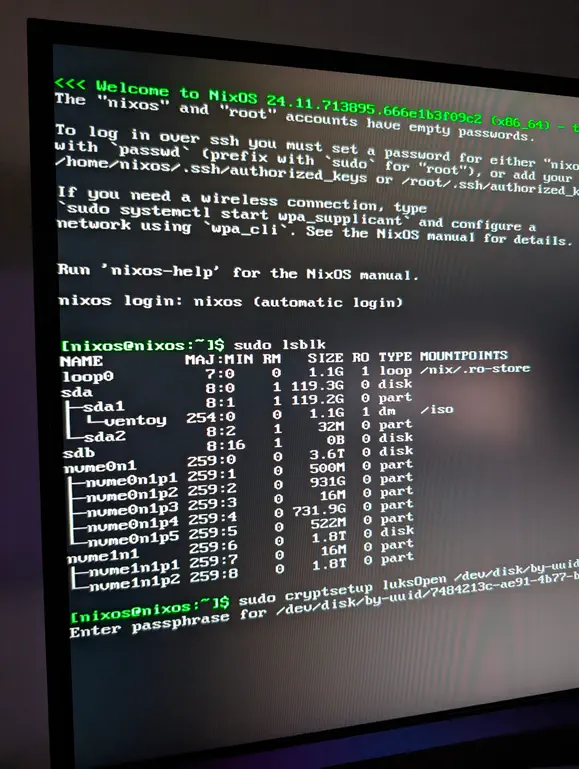
Based on a similar post I’d used to rescue my own NixOS desktop, this is a slightly modified version to fit my homelab/learning needs in FDE/LUKS and cryptsetup type things. My system was originally an unencrypted NixOS system running on an NVMe that I converted into a FDE setup, but it took some bumps & learnings along the way.
Boot a Rescue/Recovery media #
If you don’t already have some installation media to install NixOS, download the minimal iso image and toss it on a USB stick or other mechanism and boot your broken system from the install media.
I put mine on a large USB stick with Ventoy pre-installed on it. Ventoy isn’t necessary since I only used the minimal disk image to repair/fix my system ultimately, but the ability to boot alternative ISOs/Distros was handy for diagnosing my initial oops.
No pictures/images since this is highly dependent on your system but for reference, my installation media put me into a user environment as nixos user and required adding sudo to many of the commands to make them work. Your recovery OS may act differently so adjust as you need.
Mounting the LUKS encrypted partition to /mnt
#
You can use a simpler disk reference pattern like ... luksOpen /dev/nvme0n1p2 ... if you prefer, but I kept running into issues where my different drives kept reordering themselves so be sure you’re looking at the right device (lsblk if ya need!).
sudo cryptsetup luksOpen /dev/disk/by-uuid/<UUID-of-encrypted-partition> arbitrarilyNamedUnencryptedFSRoot

sudo mount /dev/mapper/arbitrarilyNamedUnencryptedFSRoot /mnt
Mounting the rest of the file system for chrooting & boot/system fixing purposes
#
Before the chroot the /mnted system path needs some things from the /boot partition and some things from the live running NixOS.
# To be able to modify grub settings and other boot stuff
sudo mount /dev/disk/by-uuid/<UUID-of-boot-partition> /mnt/boot

sudo mount --bind /dev /mnt/dev
sudo mount --bind /dev/pts /mnt/dev/pts
sudo mount --bind /proc /mnt/proc
sudo mount --bind /sys /mnt/sys

# Without this you'll get errors updating EFI vars and other grub/boot maintenance
sudo mount --bind /sys/firmware/efi/efivars/ /mnt/sys/firmware/efi/efivars/
Chrooting into the (hopefully now unecrypted) NixOS needing maintenance #
After mounting the boot and other system/vars above we can swap to the new system.
sudo chroot /mnt /nix/var/nix/profiles/system/activate
sudo chroot /mnt /run/current-system/sw/bin/bash
⚠️ If you encounter errors in the
chrootenvironment such aserror: cannot pivot old root directory onto… you may need to disable NixOS’s sandbox in/etc/nix/nix.confor add--option sandbox falseto variousnixos-*subcommands.
This should mostly suffice for commonish issues I hope. I’ll update with whatever critical bits I find later, but mostly this is a reference guide and not an all encompassing in-depth tutorial.
Other handy links #
- https://nixos.wiki/wiki/Full_Disk_Encryption
- https://www.adyxax.org/blog/2023/11/13/recovering-a-nixos-installation-from-a-linux-rescue-image/ (original reference w/o cryptsetup/luks stuff)
- https://wiki.nixos.org/wiki/Change_root
- https://opencraft.com/tutorial-encrypting-an-existing-root-partition-in-ubuntu-with-dm-crypt-and-luks/ (includes examples on converting non encrypted drives to encrypted drives, pay attention to the UUIDs or you might write a guide like this too🤦)
Something Else (bonus learning!) #
Don’t forget to make backups of the LUKS Header of your FDE devices and keep it somewhere safe for the future.
# View the existing header information to make sure it's the correct one first :-)
#    i.e. this isn't that kind of dump.
sudo cryptsetup luksDump /dev/disk/by-uuid/<UUID-of-encrypted-partition>

# Backup/save the header somewhere safe and importantly *NOT* on same disk the header belongs to.
# Change backup file name/location to your own preference/location.
cd /hopefully/somewhere/safe/
sudo cryptsetup luksHeaderBackup /dev/disk/by-uuid/<UUID-of-encrypted-partition> --header-backup-file ./luks-header-backup-$(hostname)-$(date '+%Y-%m-%d')

# Try opening/mounting the disk using the header backup file.
# Remember the header contains the passwords/auth methods so you may need
#   to use a password from when it was backed up and not what it was
#   most recently. Try not to get burned by forgetting it :-)
cd /that/backup/location/from/above/
sudo cryptsetup luksOpen /dev/disk/by-uuid/<UUID-of-encrypted-partition> --header-backup-file ./luks-header-backup-$(hostname)-$(date '+%Y-%m-%d') remoteHeaderFS
